

Reverse Image Search Tinder: Your Safety Guide 2026
Learn how to use reverse image search on Tinder matches to spot fake profiles and catfishes. Your essential guide to safer online dating in 2026.
You've matched with someone on Tinder who seems absolutely perfect. Great photos, witty bio, engaging chat. But something feels a bit too polished. Their photos look professional, almost stock-image quality. Before you agree to meet up, there's a simple step you can take to verify they're who they claim to be: reverse image search. This powerful tool lets you check if those profile pictures appear anywhere else online, helping you spot fake profiles, catfishes, and romance scammers before investing your time or emotions.
What Is Reverse Image Search and Why Use It on Tinder
Reverse image search works backwards from a traditional search. Instead of typing words into Google, you upload a photo and the search engine finds other places that same image appears online.
When you use reverse image search on Tinder profiles, you're essentially asking: "Where else has this photo been used?"
The results can reveal:
- Stock photography websites where the image was purchased
- Other social media profiles using the same photo
- Multiple dating profiles under different names
- News articles or websites featuring that person
- Image galleries or portfolios from photographers
This matters because genuine people typically use photos that appear on their personal social media accounts. If someone's Tinder photos show up on random websites, other dating apps with different names, or stock image libraries, that's a significant red flag.
Common Red Flags That Warrant a Reverse Image Search
Not every Tinder profile needs investigation, but certain warning signs suggest it's worth taking that extra step.
Watch out for profiles featuring:
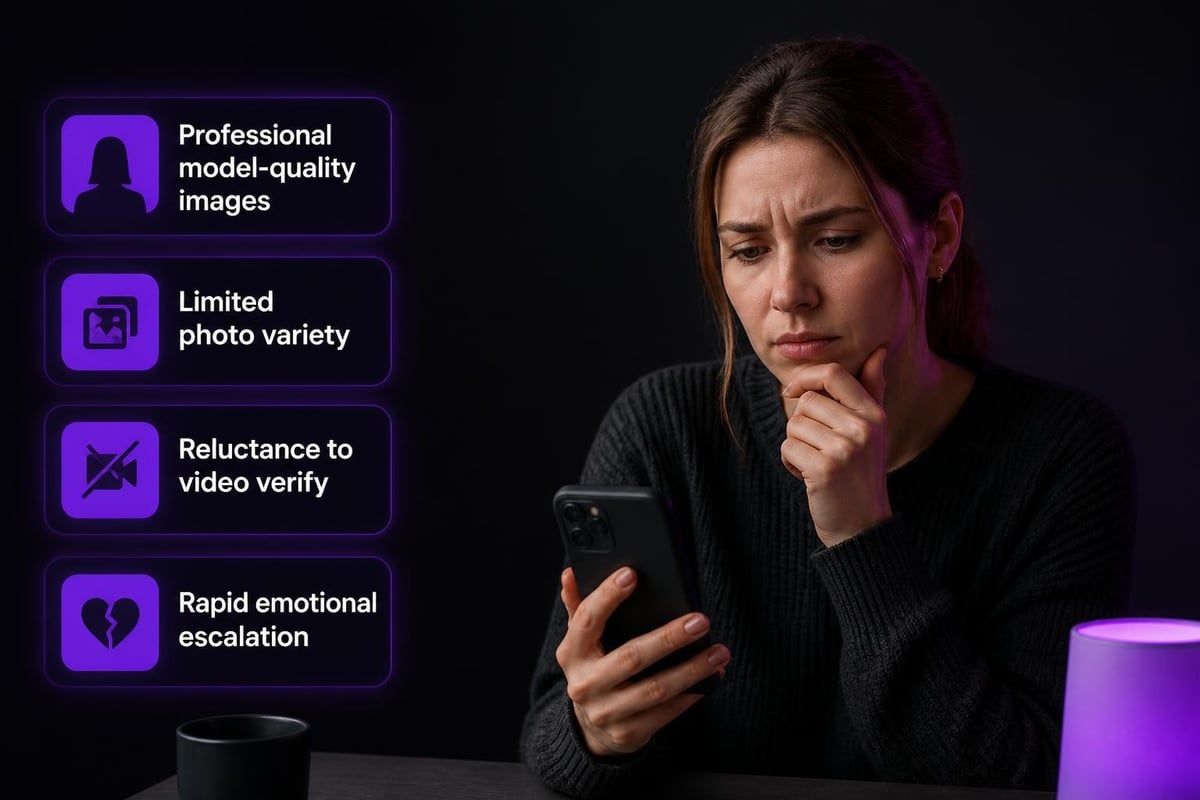
- Exceptionally attractive photos that look professionally shot
- Very few photos (one or two images only)
- Inconsistent backgrounds suggesting photos from different sources
- Reluctance to video chat despite weeks of messaging
- Quick progression to romance or requests to move off-app immediately
The combination of model-quality photos and someone who's pushing for a deep connection unusually fast often indicates a scammer using stolen images.
How to Perform Reverse Image Search Tinder Checks
You have several options for running a reverse image search on Tinder photos. Each method has slightly different strengths.
Using Google Images on Desktop
Google Images remains the most comprehensive reverse image search tool available.
- Open Tinder on your computer via the web browser
- Right-click on the profile photo you want to check
- Select "Save image as" to download it
- Visit images.google.com
- Click the camera icon in the search bar
- Upload the saved image or paste the image URL
- Review the results for matches across the web
| Method | Pros | Cons |
|---|---|---|
| Google Images | Most comprehensive results, finds similar images | Requires desktop or switching between apps |
| TinEye | Specialized for exact matches, tracks image history | Smaller database than Google |
| Yandex | Excellent for faces, international results | Interface less familiar to Aussies |
Mobile Options for Quick Checks
Since most of us use Tinder on our phones, mobile reverse image search matters.
For iPhone users:
- Take a screenshot of the Tinder profile
- Open Google Photos or Safari
- Use Google Lens (available in the Google app)
- Upload the screenshot
- Crop to just the face if needed
For Android users:
- Screenshot the profile
- Open Google Photos
- Tap the Lens icon
- Select the screenshot
- Review matches
Some third-party apps claim to integrate reverse image search directly with dating apps, but be cautious about granting these apps access to your accounts or data.
What Your Reverse Image Search Results Mean
Understanding what you find matters as much as performing the search itself.
Interpreting Common Results
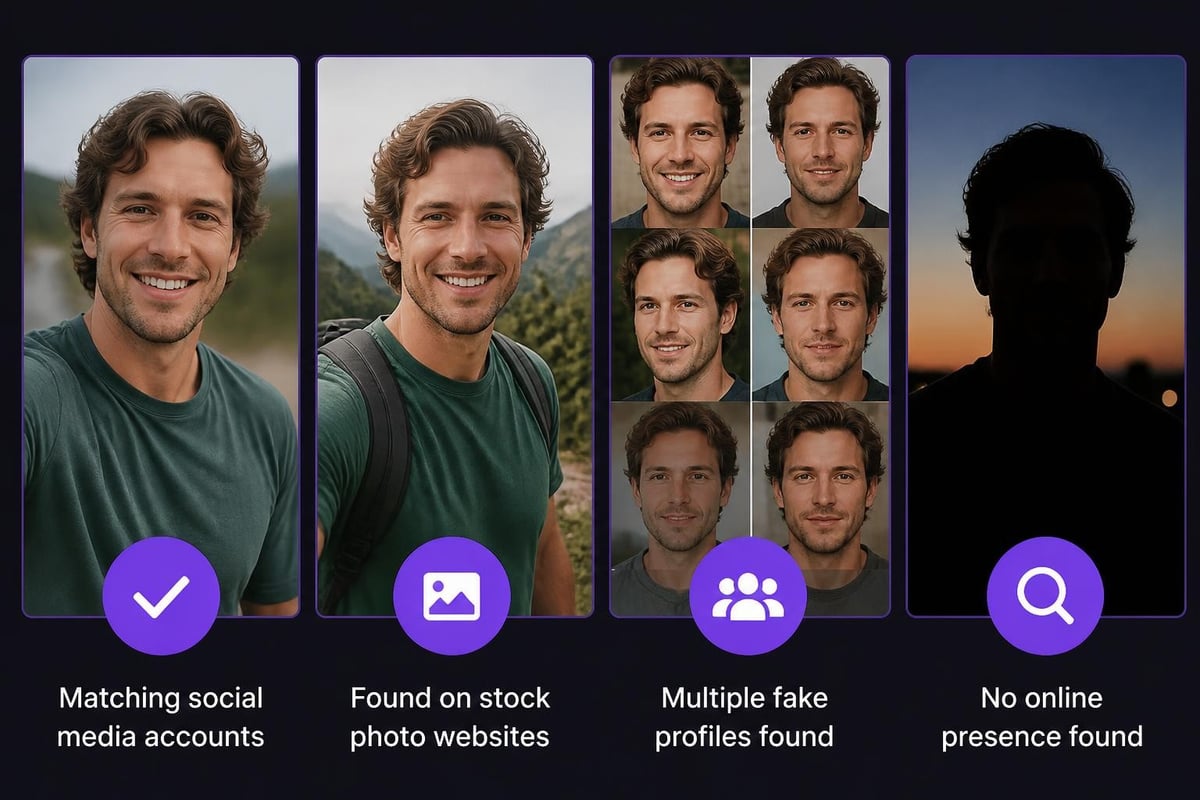
Finding their genuine social media: If the reverse image search tinder check reveals the person's Instagram, Facebook, or LinkedIn with the same name they're using on Tinder, that's actually reassuring. It suggests authenticity and you can verify their life details match what they've told you.
Discovering stock photos: This is the biggest red flag. If those gorgeous photos come from Shutterstock, Getty Images, or free photo sites like Unsplash or Pexels, you're definitely dealing with a fake profile. Real people don't use stock photography for dating apps.
Multiple dating profiles with different names: Scammers often reuse the same stolen photos across numerous platforms with varying identities. Finding the same image on three different dating sites with three different names and cities? That's a catfish.
No results at all: Interestingly, finding nothing can be legitimate. Many people use photos they've never posted publicly online. However, it could also mean someone's using very new or obscure stolen images. Cross-reference with other verification methods.
Beyond Photos: Additional Verification Steps
Reverse image search tinder profiles is just one tool in your safety toolkit. Smart daters use multiple verification methods.
Video Chat Before Meeting
The simplest catfish test is requesting a video call. Real people will generally agree, though some might feel shy initially. Scammers and catfishes will make endless excuses.
- Suggest a quick FaceTime or WhatsApp video chat
- Frame it casually: "I prefer seeing who I'm talking to before meeting up"
- Notice if they dodge repeatedly or make excuses about broken cameras
Cross-Reference Their Stories
Pay attention to consistency across conversations. Note details about their work, family, hobbies, and location. Scammers often slip up with contradictory information because they're managing multiple fake identities.
Check Their Digital Footprint
Most Australians have some online presence. While not everyone is on social media, the complete absence of any digital footprint for someone claiming to be a 35-year-old professional seems unusual in 2026.
Before meeting someone from Tinder, running a web search check can give you additional peace of mind by scanning public records, social media, and other dating platforms to verify their identity.
Privacy and Ethics: Important Considerations
While reverse image search is a legitimate safety tool, it's worth thinking about the ethical dimensions.
When It's Appropriate
Using reverse image search tinder profiles makes sense when:
- You've noticed concerning inconsistencies or red flags
- Someone is pushing hard to meet quickly or move money
- Your intuition says something feels off
- You're about to meet someone in person for the first time
Respecting Boundaries
Everyone deserves basic privacy. Conducting reasonable safety checks differs from deep surveillance or stalking. If your reverse image search shows someone's genuine social media, there's no need to scroll through years of their posts or track down their family members.
The goal is safety verification, not building a complete dossier on someone before you've even met for coffee.
Real Stories: How Reverse Image Search Saves Aussies
These examples from Australian dating experiences show why this tool matters.
Sarah's Sydney Scammer
Sarah matched with "James," a supposed mining engineer working in regional WA. His photos showed a handsome bloke in high-vis gear and professional settings. After two weeks of messaging, he mentioned an equipment payment issue and asked for a short-term loan.
Something felt off, so Sarah ran a reverse image search. The photos appeared on Instagram belonging to a real mining engineer in Canada. "James" was using stolen photos to run romance scams. Sarah reported the profile and blocked the scammer.
Michael's Melbourne Match
Michael nearly cancelled a date after finding his match's photos on what looked like a modelling website. Turned out she actually had done some catalogue work years ago and those were legitimate photos of her. They went on the date, hit it off, and she appreciated that he'd been careful about his safety.
The lesson? Reverse image search provides information, but context matters. Finding professional photos doesn't automatically mean fake; it means asking questions.
What to Do When You Find Something Concerning
Discovering troubling results from your reverse image search can feel disappointing, especially if you&